OfferFlow User Guide
🎯 For the Internship-Hunting CS Student
Let's be honest applying for internships can be a nightmare. Between grinding LeetCode questions, projects and actually attending classes, tracking internship applications can itself become a full-time job.
Hence, OfferFlow was built by CS students by CS students as we understand the struggle. OfferFlow is a desktop app that helps you:
- Track every internship application without the spreadsheet and calender reminder chaos
- Update and moniter application statuses in seconds unlike spreadsheet which can be very time-consuming
- Keep all your opportunities organised with minimal overhead!
If you can type fast, OfferFlow will manage your internship pipeline faster than any GUI-focused application!
Quick start
Ensure you have Java
17or above installed in your Computer.<br>Mac users: Ensure you have the precise JDK version prescribed here.Download the latest
.jarfile from here.Copy the file to the folder you want to use as the home folder for your OfferFlow.
Open a command terminal,
cdinto the folder you put the jar file in, and use thejava -jar OfferFlow.jarcommand to run the application.
A GUI similar to the below should appear in a few seconds. Note how the app contains some sample data.
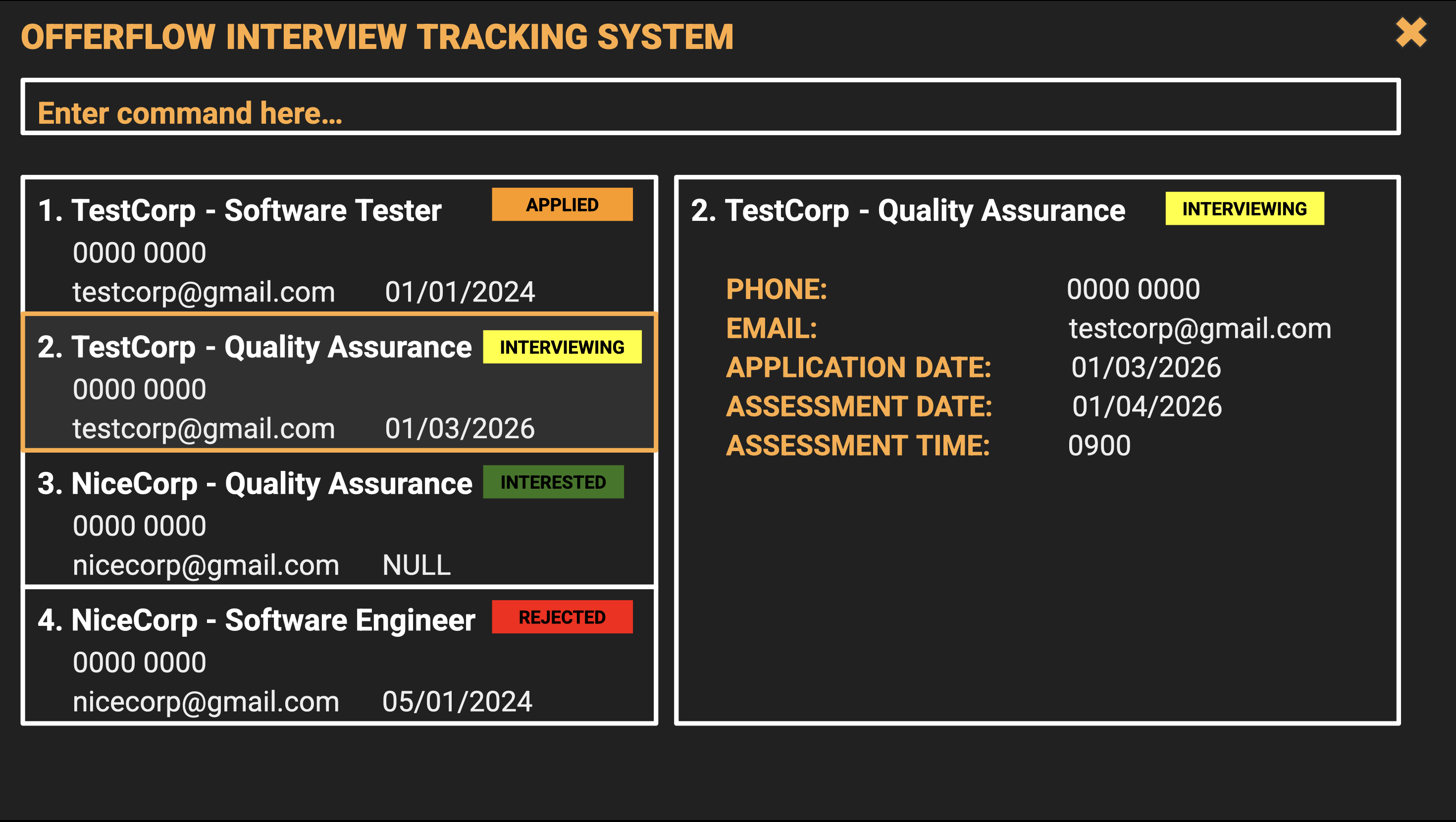
Type the command in the command box and press Enter to execute it. e.g. typing
helpand pressing Enter will open the help window.<br>Some example commands you can try:list: Lists all internship applications.add n/Google p/96789012 e/google@gmail.com a/70 Pasir Panjang Rd, #03-71 d/2024-06-18 r/Backend Developer s/interviewed t/java: Adds your internship application to Offerflow.delete 3: Deletes the 3rd contact shown in the current list.clear: Deletes all applications.exit: Exits the app.
Refer to the Features below for details of each command.
Features
Notes about the command format:<br>
- Words in
UPPER_CASEare the parameters to be supplied by the user.<br>e.g. inadd n/NAME,NAMEis a parameter which can be used asadd n/Google. - Items in square brackets are optional.
<br>e.gn/NAME [t/TAG]can be used asn/Google t/javaor asn/Google. - Items with
…after them can be used multiple times including zero times.<br>e.g.[t/TAG]…can be used ast/java,t/java t/Reactetc. - Parameters can be in any order.
<br>e.g. if the command specifiesn/NAME p/PHONE_NUMBER,p/PHONE_NUMBER n/NAMEis also acceptable. - Extraneous parameters for commands that do not take in parameters (such as
help,list,exitandclear) will be ignored.<br>e.g. if the command specifieshelp 123, it will be interpreted ashelp. - If you are using a PDF version of this document, be careful when copying and pasting commands that span multiple lines as space characters surrounding line-breaks may be omitted when copied over to the application.
</box>
Viewing help : help
Shows you a message explaining how to access the help page.

Format: help
Adding an internship application: add
Adds the internship application you have applied for, to help you keep track of all your applications.
Caution: OfferFlow by default does not allow duplicate application with same name and role. Hence, if you choose to add application with duplicate name and role, you can choose whether or not to overwrite it (ie: replace the pre-existing application with the new application)
Format: add n/NAME p/PHONE e/EMAIL a/ADDRESS d/DATE r/ROLE s/STATUS [t/TAG]...
Tip: An application can have any number of tags (including 0)
Parameters
n/NAME→ Name of the companyp/PHONE→ company telephone numbere/EMAIL→ company emaila/ADDRESS→ company locationd/DATE→ date when you appliedr/ROLE→ job position applied fors/STATUS→ application progresst/TAGS→ optional fields
Notes:
- name and role is case insensitive
- Email must use
@symbol - Applied dates must use
YYYY-MM-DD
Examples:
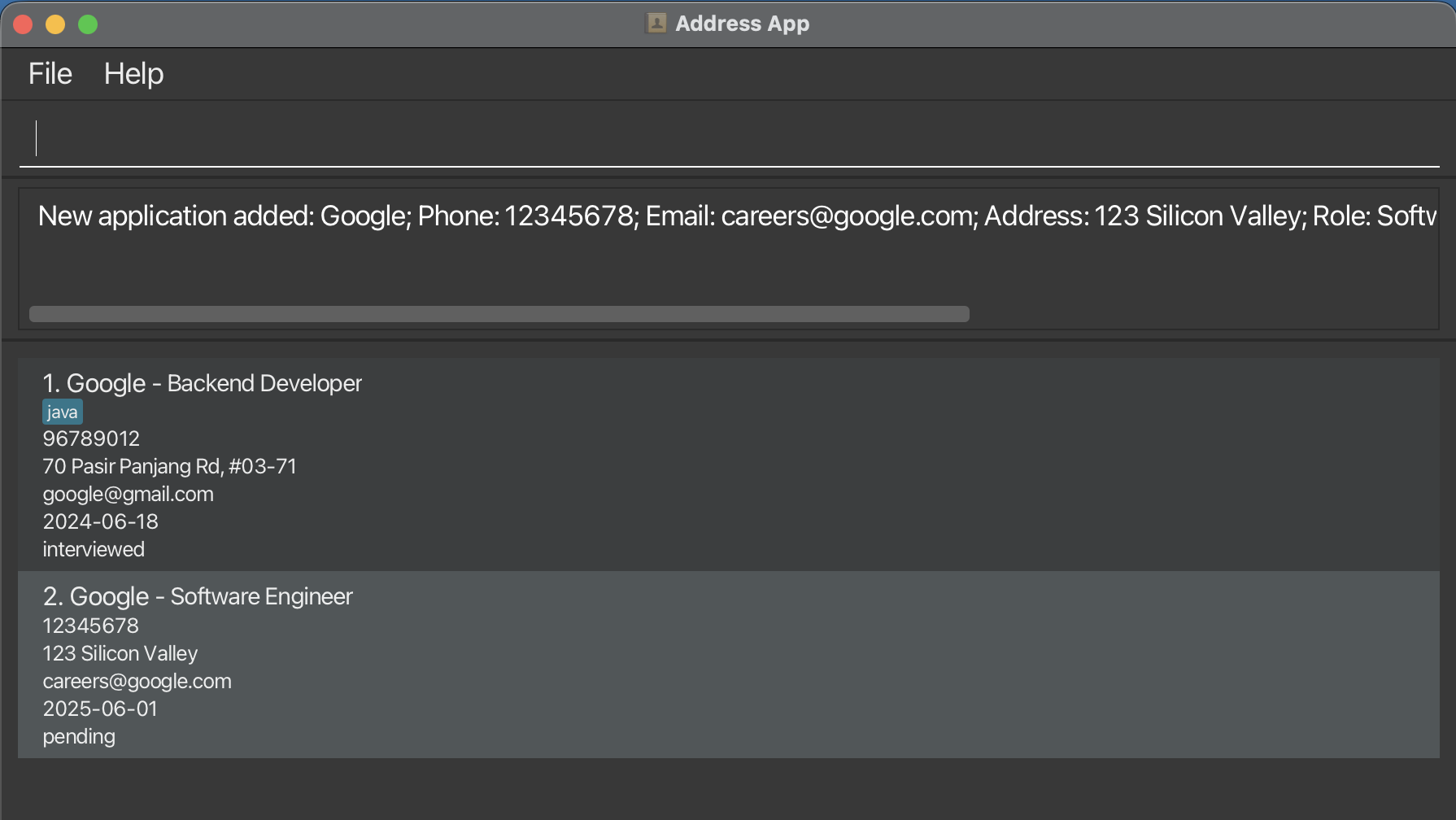
add n/Google p/96789012 e/google@gmail.com a/70 Pasir Panjang Rd, #03-71 d/2024-06-18 r/Backend Developer s/interviewed t/javaadd n/Google p/12345678 e/careers@google.com a/123 qSilicon Valley d/2025-06-01 r/Software Engineer s/pending
Expected Outcome:
Overwrite duplicate application : overwrite
Caution: OfferFlow by default does not allow duplicate application with same name and role. Hence, if you choose to add application with duplicate name and role, you can choose whether or not to overwrite it (ie: replace the pre-existing application with the new application)
Overwrites pre-existing application in OfferFlow that has the same name and role, with the new application when you try to add an application with the same name and role as another already existing application
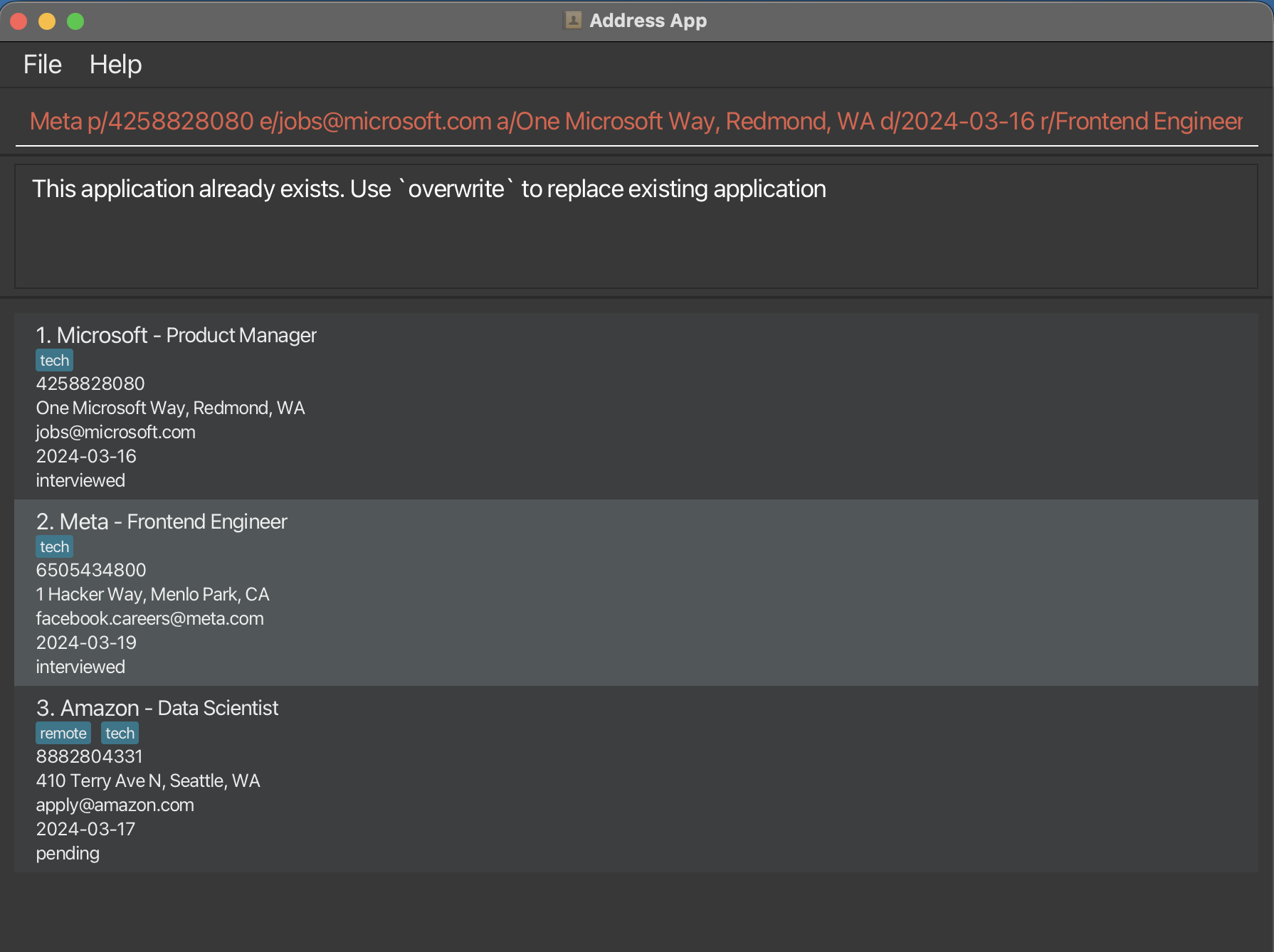
Format: overwrite
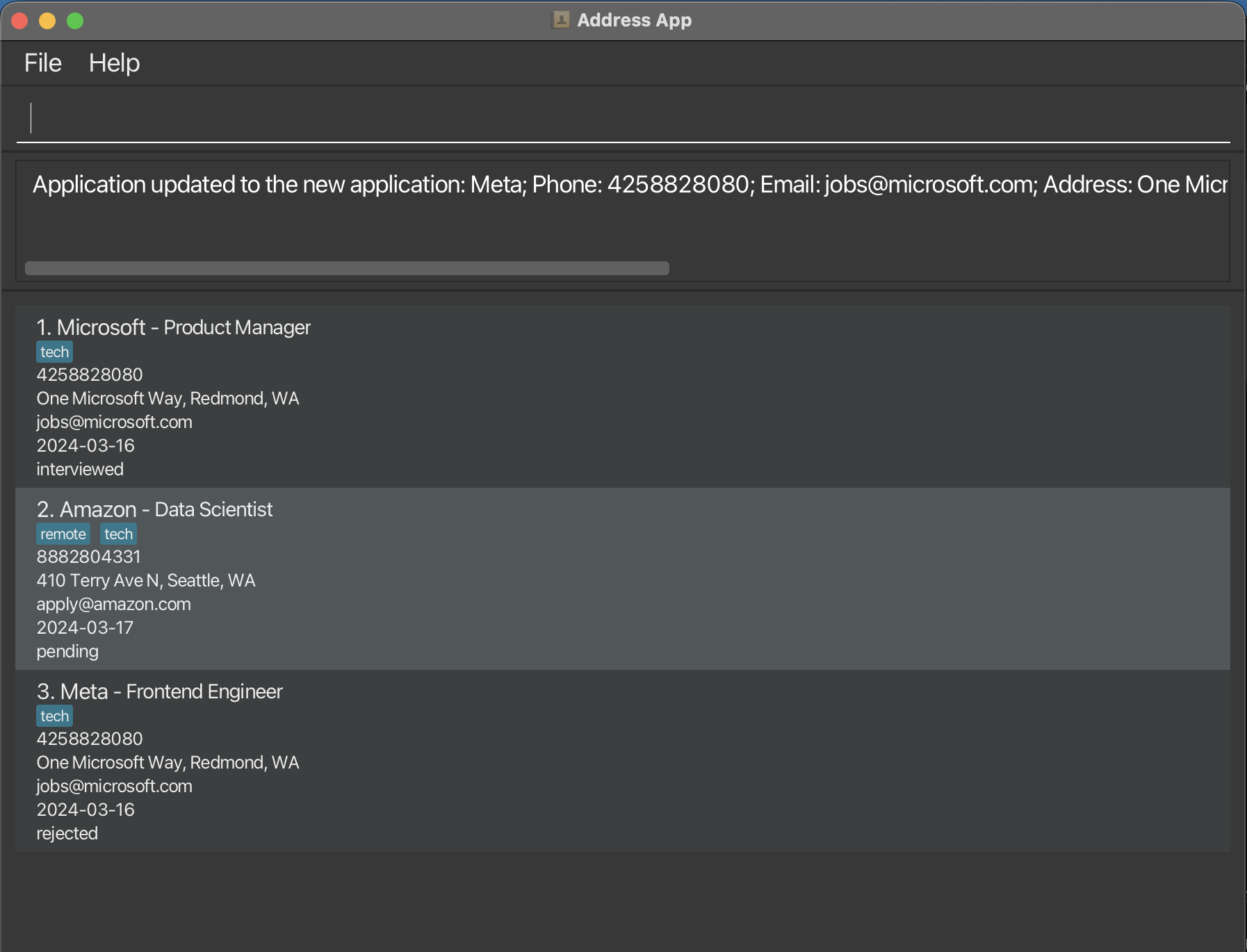
If you choose to overwrite, type overwrite. If not, continue using the app as per normal and the new duplication application you were trying to add will be automatically discarded
Expected Outcome (overwrite):
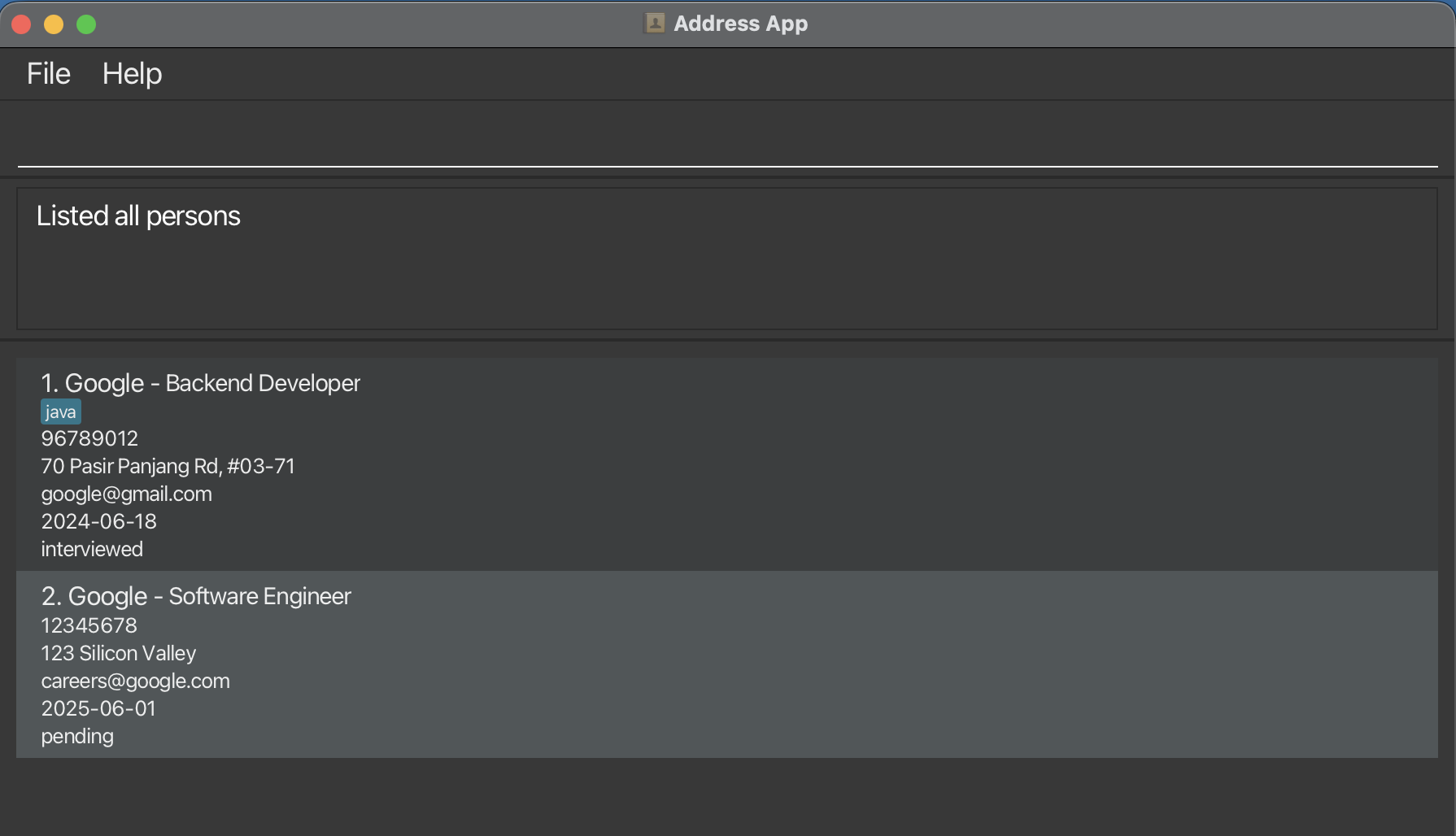
Listing all internship applications : list
Shows a list of all the internship applications you have added on OfferFlow.
Format: list
Expected Outcome:
Editing an application : editmode
Format:
editmode INDEXoreditmode n/NAME r/ROLEto enter edit mode to edit that particular application- Type in any combination of at least one of the parameters below to edit the application
exiteditto finish editing and exit the editing mode
Notes:
- Enters editing mode for the application at the specified
INDEXor with the specifiedNAMEandROLE. The index refers to the index number shown in the displayed person list. The index must be a positive integer 1, 2, 3, … - Once editing mode is entered, all commands except for editexit and editing commands will be disabled.
- Edit the application in edit mode by typing in at least one of the optional fields.
- Existing values will be updated to the input values.
- When editing tags, the existing tags of the person will be removed i.e adding of tags is not cumulative.
- You can remove all the person’s tags by typing
t/without specifying any tags after it.
Parameters
n/NAME→ Name of the companyp/PHONE→ company telephone numbere/EMAIL→ company emaila/ADDRESS→ company locationd/DATE→ date when you appliedr/ROLE→ job position applied fors/STATUS→ application progresst/TAGS→ optional fields
Examples:
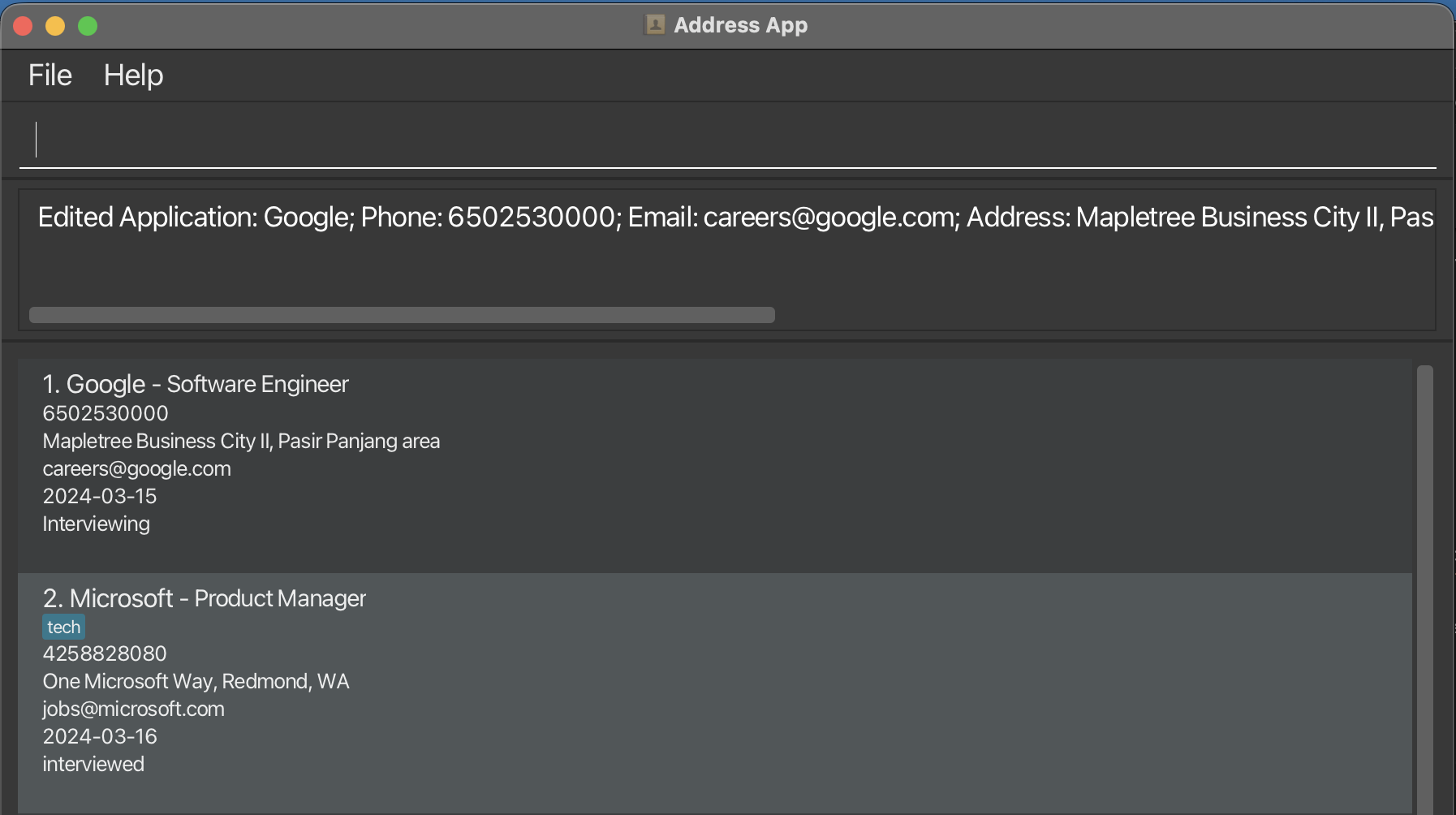
editmode 1oreditmode n/Google r/Software Engineera/Mapletree Business City II, Pasir Panjang area t/High Priorityexitedit
Expected outcome:
Modifying Reminders: Reminder
Use editmode command to modify or create new Reminders.
Format: u/DESCRIPTION ud/DATE
Example: u/upcoming interview ud/2026-12-12
- Creates a new upcoming interview Reminder on 12 December 2026.
Use rmr command outside of editmode to remove Reminder of specified Applciation.
Format: rmr <INDEX> or rmr n/<Company_Name> r/<Role>
Example: rmr 1 or rmr n/Google r/software engineer
- Removes reminder associated to the specified Application.
INDEX: Application index reflected on list.<Company_Name> <Role>: Application that represents an Application to<Company>for<Role>.
Updating application status: status
Updates the status of an existing application.
Format: status n/COMPANY_NAME r/JOB_ROLE s/STATUS
Tip: Status is case-insensitive (e.g. applied, Applied, APPLIED all work)
Parameters
n/COMPANY_NAME→ Name of the companyr/JOB_ROLE→ Role applied for (must match exactly)s/STATUS→ New status
Valid Statuses
| Status | When to use |
|---|---|
| Interested | Found the role, planning to apply |
| Applied | Submitted your application |
| Interviewing | Interviews scheduled (congrats, halfway there!) |
| Rejected | Didn't get it (we've all been there) |
| Offered | 🎉 You got the offer! |
Examples
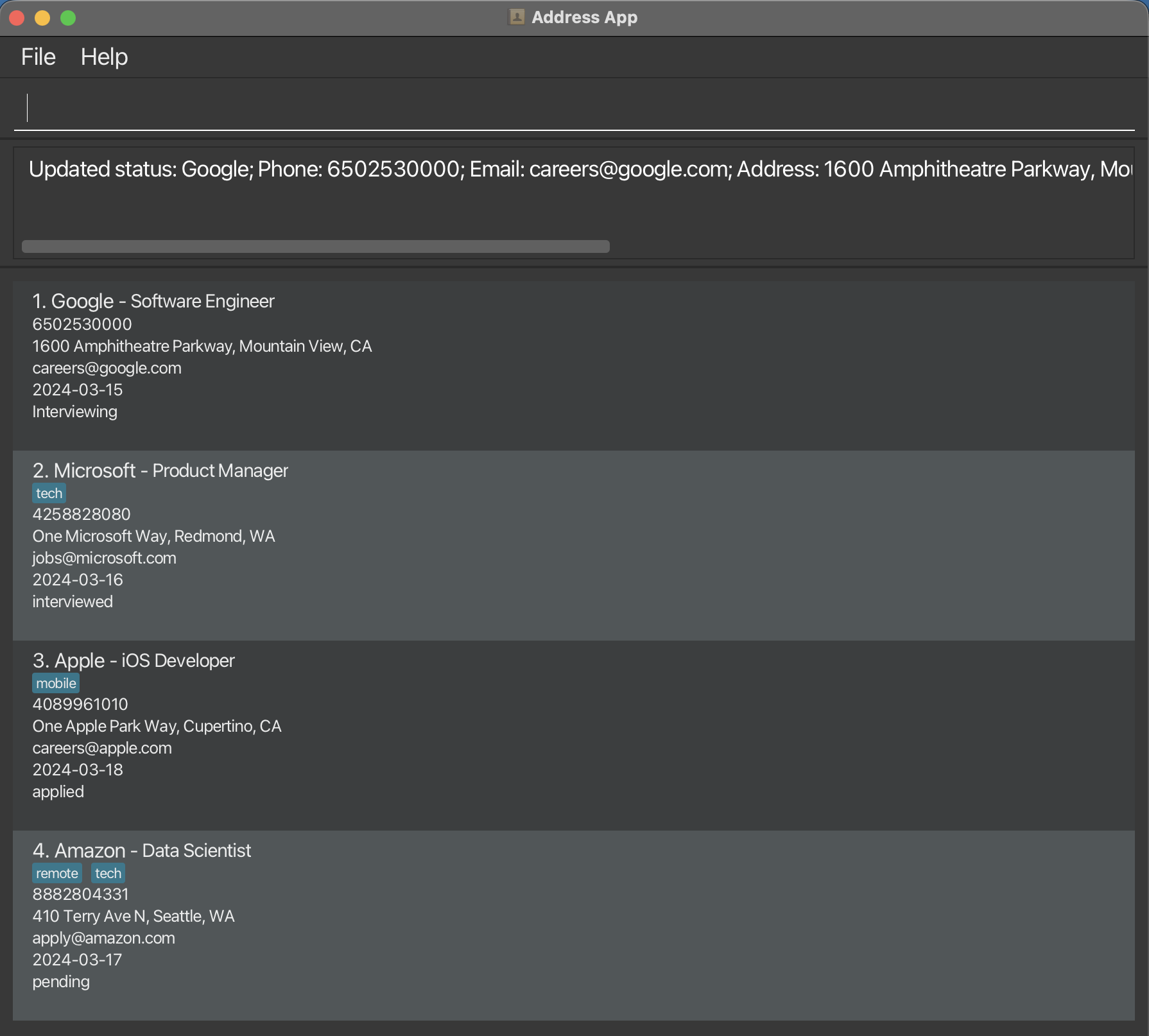
status n/Tiktok r/Data Analyst s/Appliedstatus n/Google r/Software Engineer s/Interviewingstatus n/Meta r/ML Engineer s/Rejected
Expected Outcome
Caution:
- Both company name and role must match exactly
- Command will fail if:
- missing parameters
- invalid format
- application does not exist
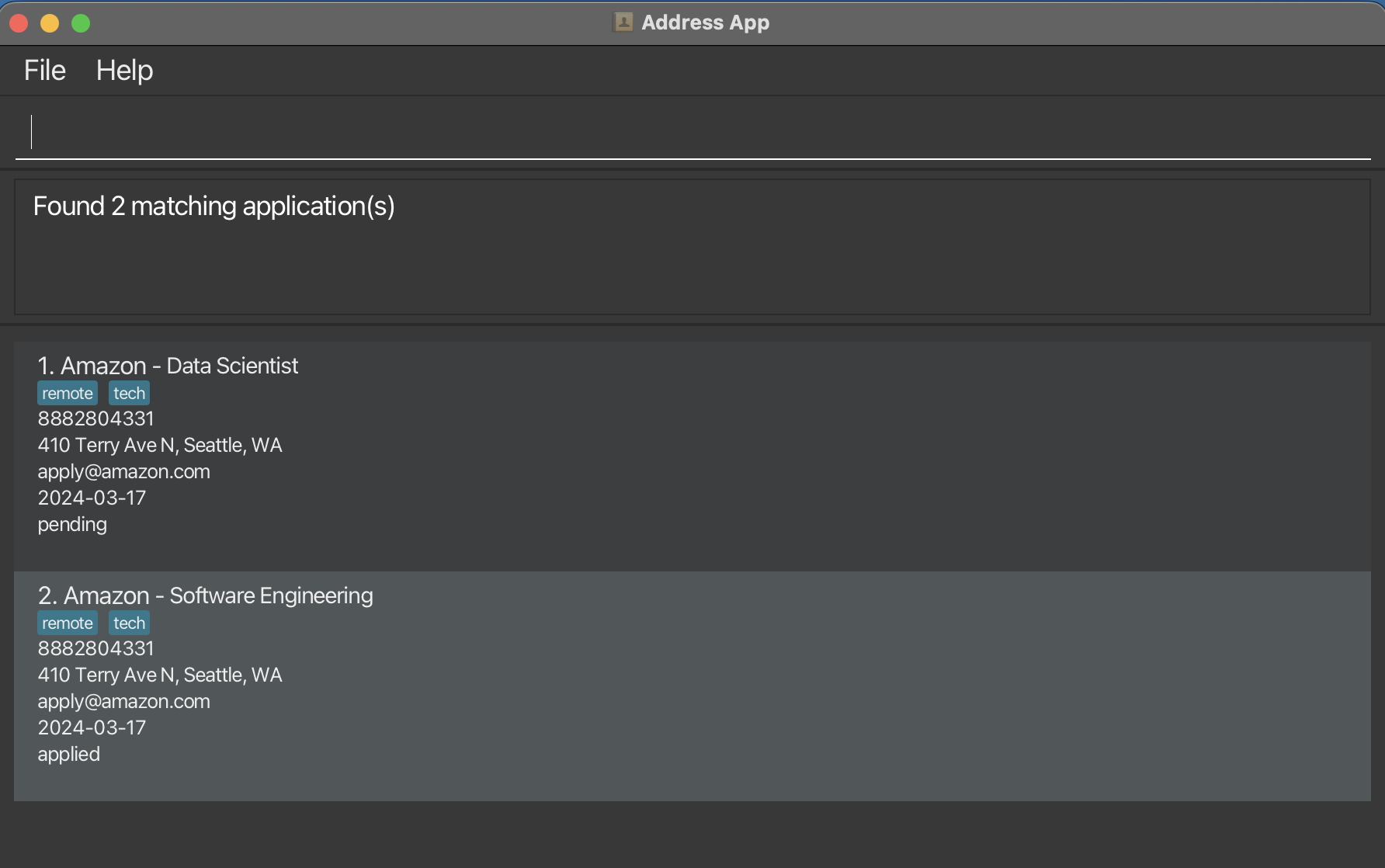
Locating applications by the company name: find
Helps you finds applications whose company names contain any of the given keywords.
Format: find KEYWORD [MORE_KEYWORDS]
Parameters
KEYWORD→ Name of the company[MORE_KEYWORD}→ Name of the company
- The search is case-insensitive. e.g
googlewill matchGoogle - The order of the keywords does not matter. e.g.
Google Metawill matchMeta Google - Only the company name is searched.
- Only full words will be matched e.g.
Googwill not matchGoogle - Applications matching at least one keyword will be returned (i.e.
ORsearch). e.g.Google Metawill returnGoogle,Meta
Examples
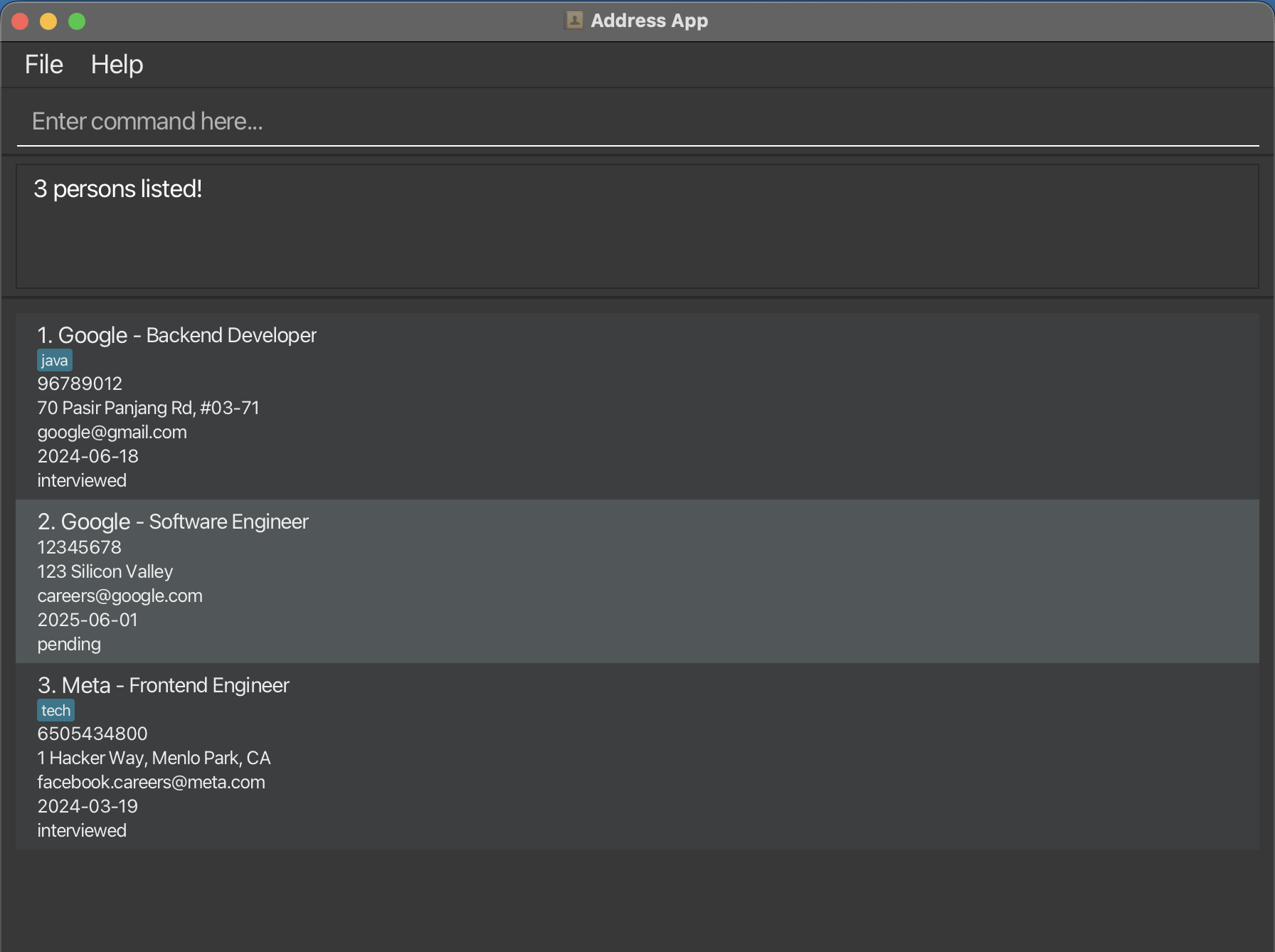
find Metareturns all applications applied toMetafind Meta Googlereturns all applications applied toMetaandGoogle
Expected Outcome:
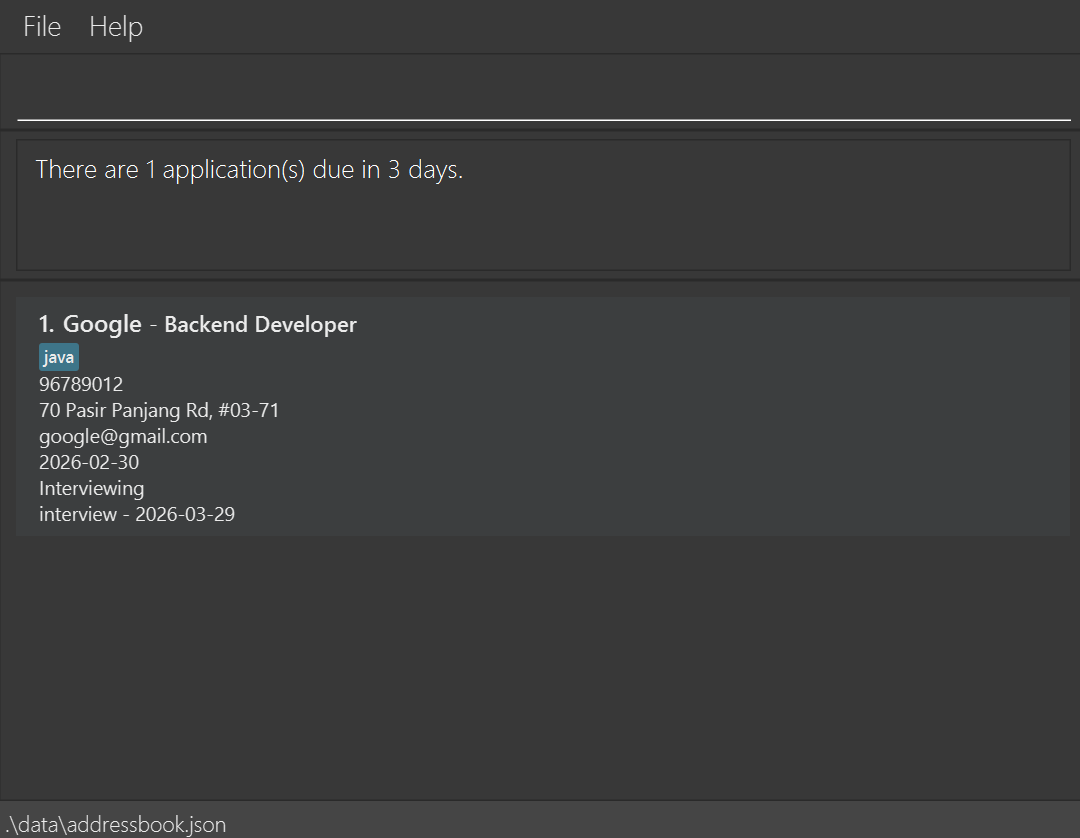
Locating applications with upcoming deadlines: upcoming
Helps you finds applications with upcoming reminders. Also sets OfferFlow to automatically filter for applications with reminders due within the specified number of days on start-up.
Format: upcoming [DAYS]
Parameters
[DAYS]→ An integer X from 0 to 7 inclusive, such that applications with reminders due within X days from today are returned.
- Applications with no reminders at all will not be returned.
- Applications with reminders that are overdue (e.g due prior to the current date) will not be returned.
Examples
upcoming 0returns all applications with reminders due within 0 days of today, ergo by today.upcoming 7returns all applications with reminders due within 7 days of today, ergo within a week.
Expected Outcome:
Filtering applications: filter
Filters applications by company, applied date, status, or tag.
Format:
filter /n /KEYWORDfilter /d /YYYY-MM-DDfilter /s /STATUSfilter /t /TAG
Parameters
KEYWORD→ Name of the companyYYYY-MM-DD→ dateSTATUS→ application progressTAG→ tags in the application
Notes:
- Filter matching is case-insensitive.
- Leading and trailing spaces are ignored.
- Internal spacing still matters.
- Applied dates must use
YYYY-MM-DD.
Examples:
filter /n /Googlefilter /d /2025-11-11filter /s /Appliedfilter /t /java
Expected Outcome
Deleting an application : delete
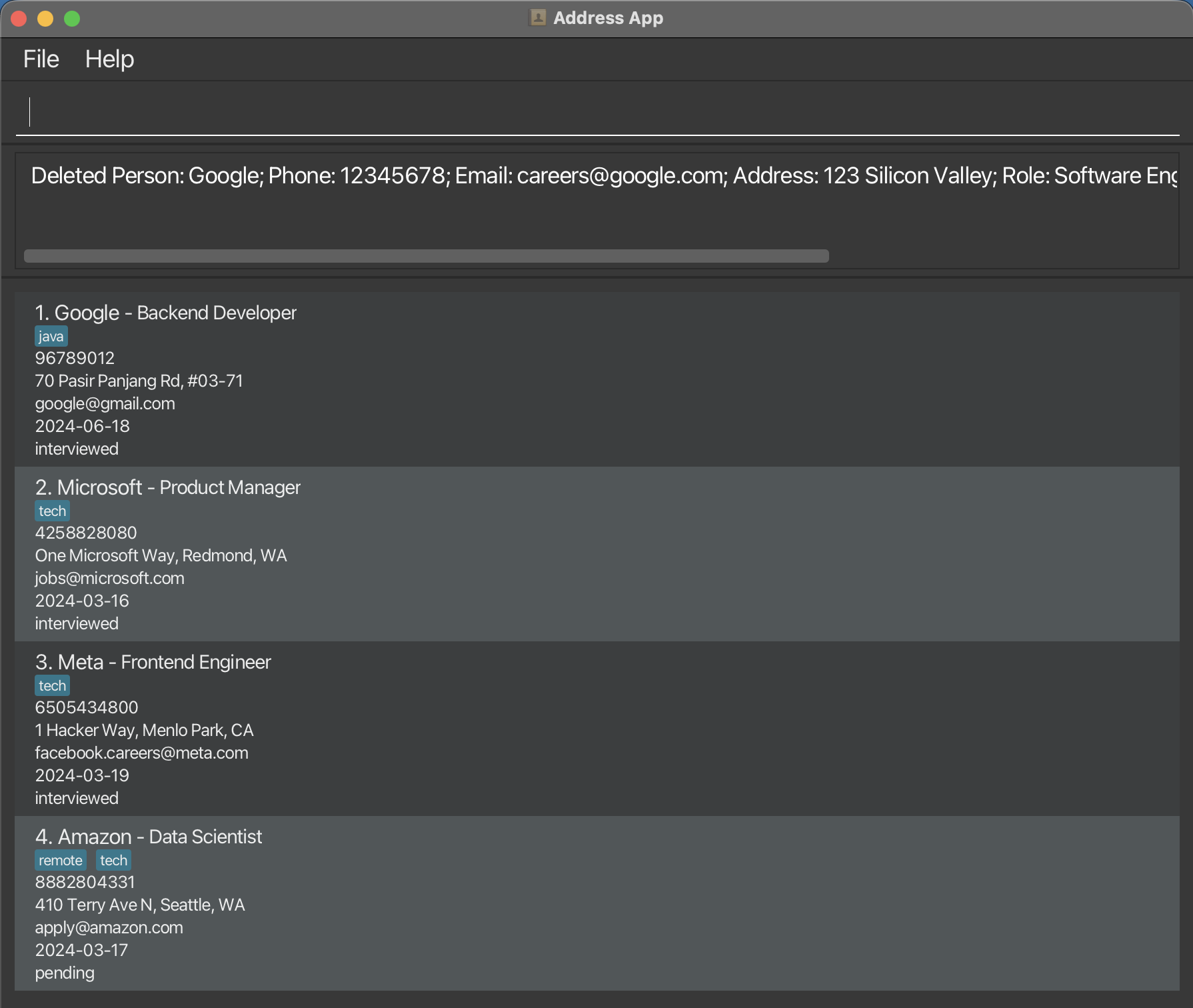
You can delete a specified application from OfferFlow via index or reference via Company name and Role.
Format: delete INDEX
- Deletes the Application at the specified
INDEX.
Parameters
INDEX→ the index number shown in the displayed application list
Caution:
- The index must be a positive integer 1, 2, 3, …
Examples
delete 2deletes the application displayed at index 2
Expected Outcome:
Format: delete n/NAME r/ROLE
- Deletes the specific Name and Role Application
Parameters
NAME→ company nameROLE→ job position
Examples
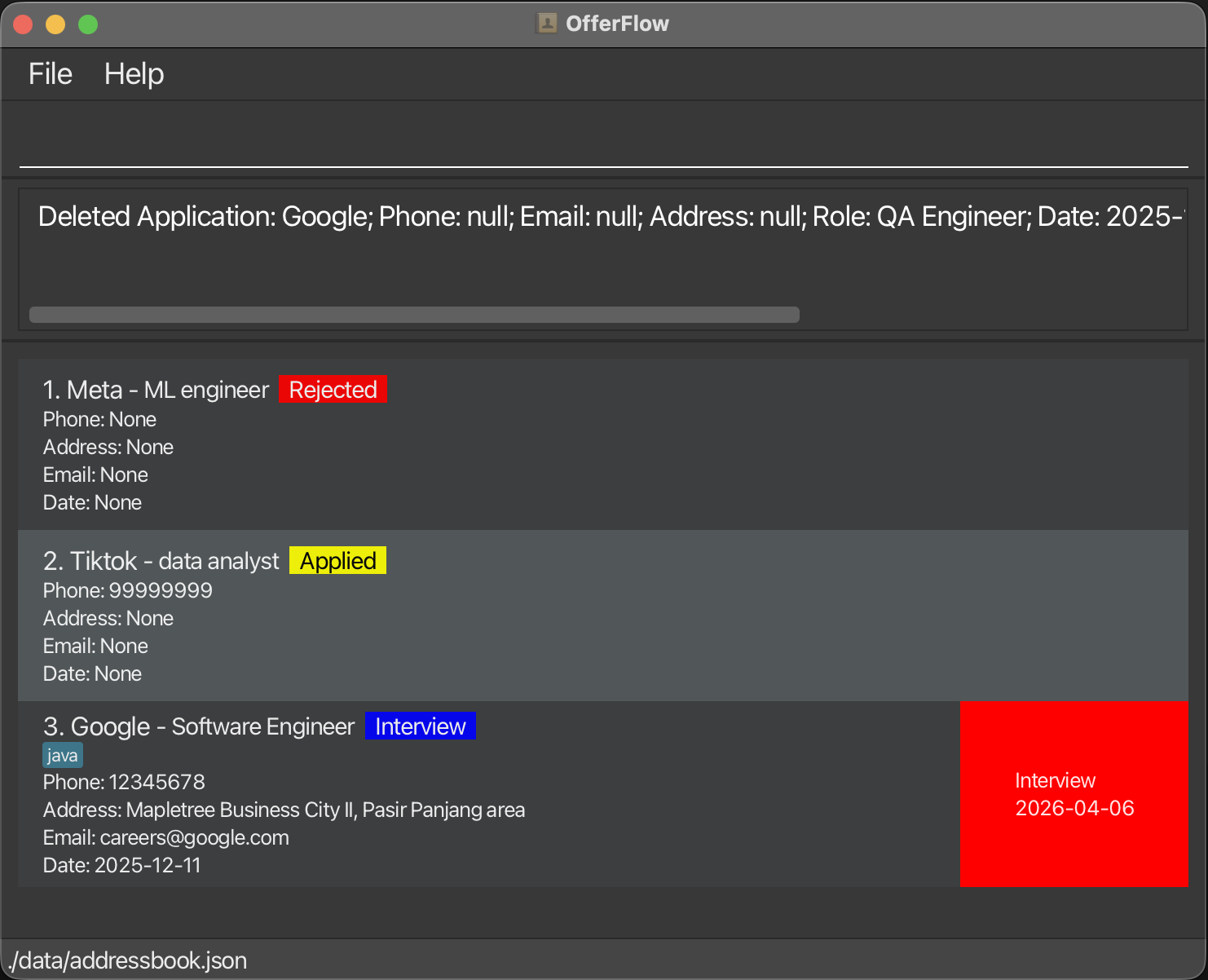
delete n/google r/Backend Developerdeletes the application for Google as Backend Developer.
Expected Outcome:
Creating a new address book : folder
Creates a new empty address book saved under data/FOLDER_NAME.json and switches to it.
Format: folder FOLDER_NAME
Parameters
FOLDER_NAME→ Name for the new address book (letters, numbers, underscores, and hyphens only)
Caution:
- Folder name cannot be empty
- Folder name cannot contain spaces or special characters (e.g.
@,.) - If a folder with the same name already exists, the command will fail. Use
toggle FOLDER_NAMEto switch to it instead.
Examples
folder Y1S2creates and switches to a new address book atdata/Y1S2.jsonfolder internships-2025creates and switches todata/internships-2025.json
Expected Outcome:
- A new empty address book is created and you are switched to it immediately.
- The status bar at the bottom of the window updates to show the current file path (e.g.
./data/Y1S2.json).
Switching to an existing address book : toggle
Switches to an existing address book saved under data/FOLDER_NAME.json.
Format: toggle FOLDER_NAME
Parameters
FOLDER_NAME→ Name of the existing address book to switch to
Caution:
- Folder name cannot be empty
- Folder name cannot contain spaces or special characters
- The address book file must already exist at
data/FOLDER_NAME.json
Examples
toggle Y1S2switches to the address book atdata/Y1S2.jsontoggle internships-2025switches todata/internships-2025.json
Expected Outcome:
- You are switched to the specified address book and its applications are loaded.
- The status bar at the bottom of the window updates to show the current file path (e.g.
./data/Y1S2.json).
Listing all address books : folders
Lists all existing address books saved in the data directory.
Format: folders
Expected Outcome:
- All available address book names are displayed (one per line), sorted alphabetically.
- If no address books exist yet, a message is shown indicating the data directory is empty.
Examples
Folders available:
internships-2025
Y1S2
Y2S1
Clearing all entries : clear
⚠️ Removes ALL applications. Use with caution.
You can delete all applications on OfferFlow with just 1 command hassle-free!
Format: clear
Exiting the program : exit
Closes OfferFlow.
Format: exit
Saving the data
OfferFlow data are saved in the hard disk automatically after any command that changes the data. There is no need to save manually.
Editing the data file
OfferFlow data are saved automatically as a JSON file [JAR file location]/data/addressbook.json. Advanced users are welcome to update data directly by editing that data file.
Caution:
If your changes to the data file makes its format invalid, OfferFlow will discard all data and start with an empty data file at the next run. Hence, it is recommended to take a backup of the file before editing it.
Furthermore, certain edits can cause OfferFlow to behave in unexpected ways (e.g., if a value entered is outside the acceptable range). Therefore, edit the data file only if you are confident that you can update it correctly.
Archiving data files [coming in v2.0]
Export past applications into different folder to declutter your active list.
FAQ
Q: How do I transfer my data to another Computer?
A: Install the app in the other computer and overwrite the empty data file it creates with the file that contains the data of your previous OfferFlow home folder.
Known issues
- When using multiple screens, if you move the application to a secondary screen, and later switch to using only the primary screen, the GUI will open off-screen. The remedy is to delete the
preferences.jsonfile created by the application before running the application again. - If you minimize the Help Window and then run the
helpcommand (or use theHelpmenu, or the keyboard shortcutF1) again, the original Help Window will remain minimized, and no new Help Window will appear. The remedy is to manually restore the minimized Help Window.
Glossary
- GUI: Graphical User Interface (GUI) is a visual way to interact with a computer, using icons, menus, and pointers rather than typed commands.
Command summary
| Action | Format | Example |
|---|---|---|
| Add | add n/NAME p/PHONE e/EMAIL a/ADDRESS d/DATE r/ROLE s/STATUS [t/TAG]... | add n/Google p/96789012 e/google@gmail.com a/70 Pasir Panjang Rd, #03-71 d/2024-06-18 r/Backend Developer s/interviewed t/java |
| Overwrite | overwrite | overwrite |
| Clear | clear | clear |
| Delete | delete INDEX or delete n/NAME r/ROLE | delete 3 or delete n/Google r/Backend Developer |
| Edit | editmode INDEX or editmode n/NAME r/ROLE | editmode 1 then a/Mapletree Business City II, Pasir Panjang area then exitedit |
| Status | status n/COMPANY r/ROLE s/STATUS | status n/Tiktok r/Data Analyst s/Rejected |
| Find | find KEYWORD [MORE_KEYWORDS] | find James Jake |
| Filter | filter /n /KEYWORD or filter /d /YYYY-MM-DD or filter /s /STATUS or filter /t /TAG | filter /n /Tiktok or filter /d /2024-06-18 or filter /s /Rejected or filter /t /java |
| Folder | folder FOLDER_NAME | folder Y1S2 |
| Toggle | toggle FOLDER_NAME | toggle Y1S2 |
| List Folders | folders | folders |
| List | list | list |
| Help | help | help |